Getting paid with Stripe connect

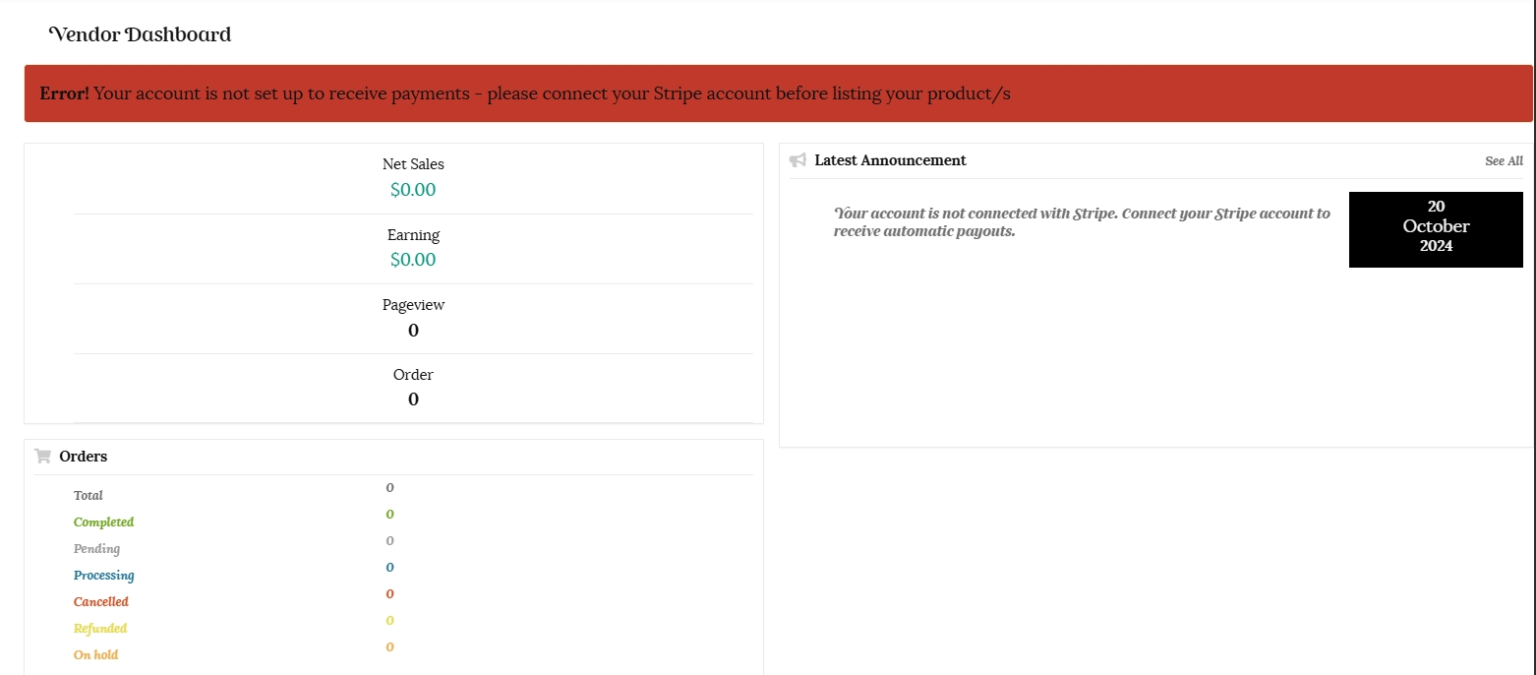
You will not be able to list products until your account is enabled for selling. Your Stripe account must be connected first to enable you to collect payment. You will see the following error message displayed in your vendor dashboard until your Stripe account is connected.

Stripe connect

Due to the rise in fraudulent selling on other platforms in New Zealand, we have restricted our payment options to credit/debit card transactions via ‘Stripe.’ This gives a measure of security for a buyer, as they know a vendor’s identity and address has been verified.


Each vendor will be required to open a standard ‘Stripe’ connected account to accept credit/debit card payment directly from a buyer. The Stripe Split Pay payment option allows you to be paid directly by Stripe with the Stripe transaction fees and Kinwi administration fees automatically deducted.


Our Payment policy allows both Buyers and Vendors to benefit from Kinwi having visibility into payments made on our Platform, because it can help improve trust, increase the security of users, help reduce fraud, make our Platform easier to use and enables Kinwi to more effectively provide support to both Vendors and Buyers should issues arise.


Stripe collects payment, automatically deducts the fees and makes payouts directly to your bank account. Kinwi Limited does not hold funds, or receive any funds bar our Administration fee. This means we do not make interest on the funds you receive from a customer, or add any commission to the Stripe transaction charges.


Please read the Stripe Connected Account Agreement here.


This Stripe Connected Account Agreement (“Connected Account Agreement”) is an agreement between Stripe and you, being the person or legal entity (including sole proprietors) identified to Stripe as the owner of the Stripe Account that is to be integrated with third-party platform providers that use Stripe Connect (“Connect Platforms”). Stripe Connect allows the Kinwi Platform to help you use the Services, which includes the ability for you to receive payments.


Stripe will have the right to deduct from your Stripe Account balance both Stripe’s fees for Services and the Kinwi  Administration fee. If your Stripe Account balance becomes negative, you authorize Stripe to debit the amount owed from your Payout Account.


Once the Stripe Transaction fee and Kinwi Administration fees are automatically deducted, the balance is paid to your nominated bank account. Vendors have a direct relationship with Stripe and are therefore responsible for Stripe fees, refunds, and chargebacks. You authorise Kinwi to perform our Platform Services and to communicate Connected account data to Stripe.


Kinwi will only use Stripe Connect and Connected Account Data consistent with our Terms of Use and Privacy policy. Please refer to the Stripe Privacy Policy. We will obtain consent from Connected Accounts before using Connected Account Data for any purpose other than providing Platform Services. Kinwi will use all reasonable efforts to protect and secure Connected Account Data from unauthorized use or disclosure.

Opening your Stripe connected account

You will be able to connect to Stripe by clicking on the “Settings” tab in your dashboard and then selecting “Payment.

Click on the “Add Payment Method arrow and select “Direct to Stripe.”

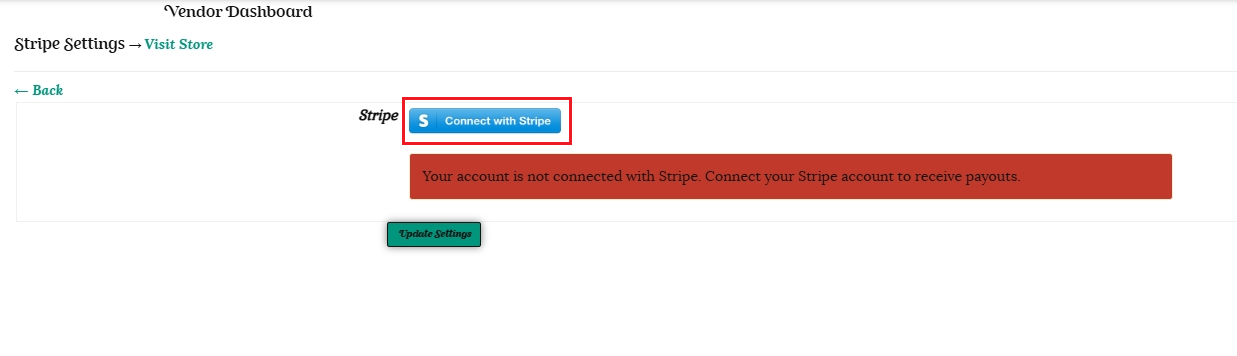
Click on the the “Connect with Stripe” button. You will be redirected to the Stripe website to take you through the steps to connect your account.

1. Enter your contact email address and click on the Continue button.

2. Choose a secure password for your account.

3. Secure your account with a mobile number, or choose to use an authenticator app or security key instead.

4. Enter New Zealand as your location and choose your type of business.

5. Verify your personal details. Fill in your legal name, your email address, your date of birth, your home address and your phone number. Press the continue button.

6. Next choose your relevant Industry from the drop down box. Your website address will be https://kinwi.co.nz/store/your-store-name

Provide a brief description of the products you are selling and press ‘Continue.’

7. Add the bank account number that you would like payments to go into. Please add this without spaces or hypens. Make sure you have read and understood the Services Agreement and press the ‘Continue’ button.

8. Add the Store name details you would like to show on customer statements.

Stripe will send you a link to verify your email address. Once your details have been processed Stripe will email you directly to provide proof of identification and address before your account is able to accept payments. This identity verification guards against fraud so is a positive attribute for buyers. You will have full access to your Stripe dashboard and also receive user support from both Kinwi and Stripe.

Due to the highly sensitive nature of your verification documents, Stripe can only accept documents which are uploaded through the Dashboard. Documents must not be sent through email.

If you are unable to follow the links provided, can upload each document type in your Dashboard here:

Further details can be found at this link.

Documents for identity and address verification

To verify individuals in New Zealand, Stripe will ask you to provide two separate documents:

  • one which serves as Proof of Identity
  • one which serves as Proof of Home Address

The information in these documents must be matched to the information on your Stripe account, so it is best to first confirm that the personal information listed on your Stripe account is correct before documents are uploaded. You can view your Stripe account personal information in your Dashboard and make any changes by clicking Edit beside your personal details. Both Proof of ID and Proof of Home Address document uploads must be successfully reviewed and matched to the information on your Stripe account before your identity can be verified. Reviews can take up to 24 hours to complete.

A summary of document standards is listed below:

Proof of Identity document requirements:

Acceptable forms of identification:

  • Passport
  • Driver license – scans of front and back are required
  • New Zealand emergency travel document
  • New Zealand refugee travel document
  • New Zealand certificate of identity

Requirements:

  • Documents must be uploaded in full color (i.e. no black-and-white scans)
  • Documents must be clear and large enough to read
  • Photocopies of identity documents are not acceptable
  • Documents must be valid and not expired
  • Complete documents must be uploaded. A complete document is defined as:
    • Both front and back of a driver’s license or identity card
    • The entire personal information page of a passport
  • Documents can be uploaded in .png or .jpg format (photos and color scans acceptable)
  • If the ID is from the Netherlands, make sure your citizen service number (BSN) is not visible in the photo.

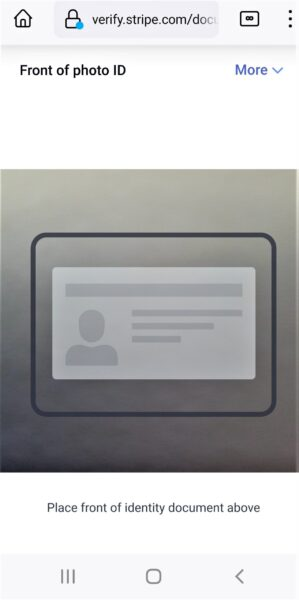
You will be prompted to verify your ID by;
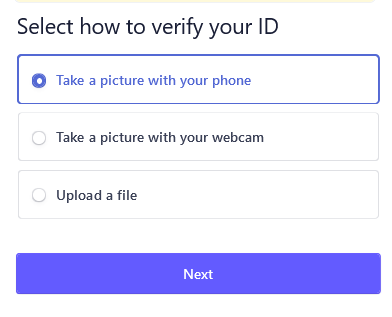
  • taking a picture with your phone
  • taking a picture with your webcam
  • or by uploading a file

You then have option tabs to complete the verification by;
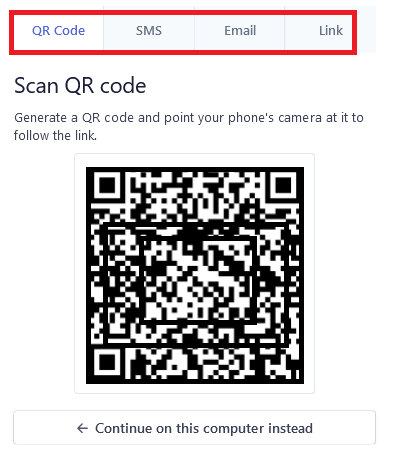
  • Scanning a QR code
  • Receiving a link by text on your phone
  • Receiving a link via email to complete the verification on a different device
  • By generating a link to open in another browser or on another device.

Follow the prompts to add your selected identification.
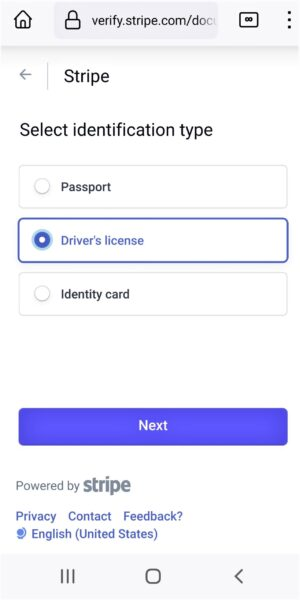
Both sides of your driver’s license will need to be provided if this is selected.
Proof of Home Address document requirements

Next you will be prompted to add your home address verification, if this was not already included on your proof of ID. such as your Driver’s license.
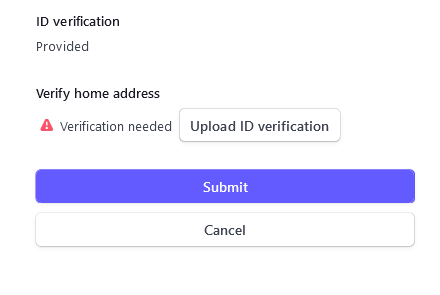
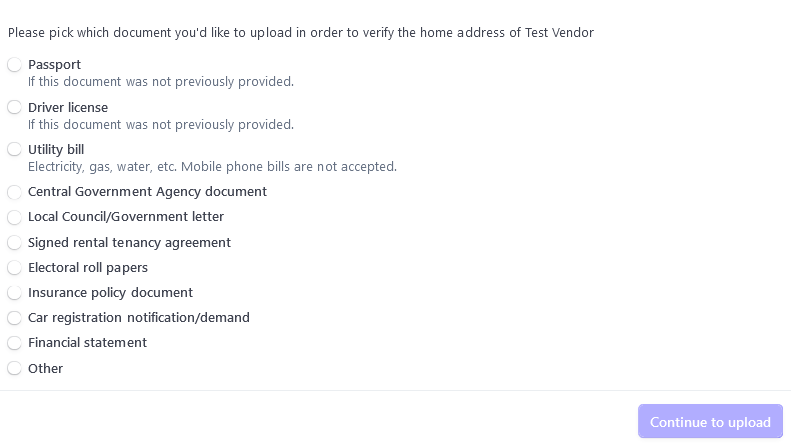
You are able to select one of the documents shown on the screenshot below to upload;
Requirements:

  • Documents must be clear and large enough to read
  • Documents must be dated within the past six months
  • Complete documents must be uploaded. A complete document is defined as:
    • At least one full page of the document
    • The exact full name and address of the individual are clearly stated and legible
  • Documents can be uploaded in .png, .jpg, or .pdf format

Documents for business verification

Acceptable forms of legal entity verification:

  • Statement from a financial institution
  • Government issued letter
  • VAT Registration
  • New Zealand Business Number Registration Extract
  • New Zealand Companies Office Company Extract
  • New Zealand Certificate of Incorporation
  • New Zealand Certificate of Good Standing
  • Memorandum of Association
  • Financial statement

Further details regarding documents for identity and home address verification can be found at this link.
Payment timeframe

For all Stripe connected accounts there is a 7 day waiting period from the time of the first charge to the first payout. This delay allows Stripe to mitigate some of the risks inherent in providing credit services.

After this, the payout speed in New Zealand is 4 business days. Further details regarding the payout speed can be found here.

Stripe fees

For Stripe users in New Zealand, Goods and Services Tax (GST) applies to Stripe’s Connect and Radar fees at the current GST rate of 15%.

The Stripe fees are currently 2.7% plus NZ$0.30 per transaction. Please see this link for pricing.

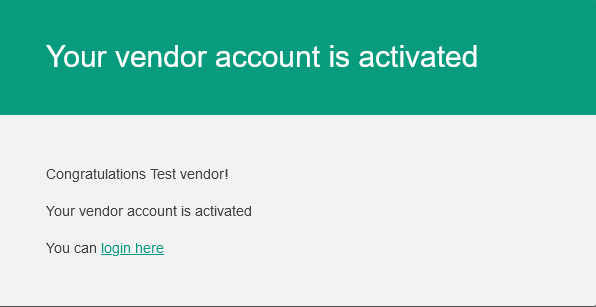
Once your Stripe account is connected and your vendor account is approved, you will receive a confirmation email and be able to list your products.

If you need further assistance in setting up your Stripe account, you are welcome to contact us at any time. We are happy to help.